MSR X6 Software & Driver Download for Windows, Mac and Android
Independent MSR X6 software, driver, compatibility, and troubleshooting resource.

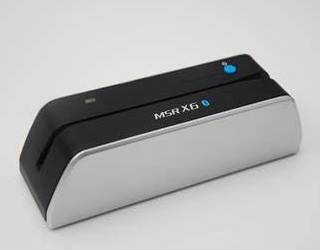

MSRX6.net is an independent resource for owners and technicians using the MSR X6 / MSRX6 / MSRX6BT magnetic-stripe reader/writer in authorized business, maintenance, development, and testing environments.
Use responsibly: Only read or write cards and test media that you own or are explicitly authorized to service. Never store or process sensitive payment-card data unless your organization has an approved, compliant workflow.
Start here
- Download MSR X6 software for supported desktop and mobile platforms.
- Install the Windows driver and software on Windows 10 or 11.
- Follow the Bluetooth setup guide for MSRX6BT.
- Review the MSR X6 user manual and safe setup guide.
- Fix detection, pairing, and installation issues in Troubleshooting.
MSR X6 model compatibility
| Model | Connection | Windows | macOS | Android/iOS |
|---|---|---|---|---|
| MSRX6 USB | USB | Yes | Yes | No |
| MSRX6BT / Bluetooth model | USB + Bluetooth | Yes | Yes | Yes, with a compatible app |
Check the model label before downloading software. Bluetooth capability cannot be added to a USB-only unit through software.
Key specifications
- ISO 7811-compatible magnetic-stripe media; Tracks 1, 2 and 3
- Hi-Co and Lo-Co support, depending on media and configuration
- USB-powered operation; Bluetooth on supported MSRX6BT models
- Manual, single-direction swipe
- Approximate dimensions: 140 × 42 × 42 mm; weight: about 145 g
Compatibility may vary by hardware revision and application version. Confirm requirements on the relevant download page before installation.
Popular resources
- MSR X6 software download for Windows
- MSR X6 software for Mac
- MSR X6 Android app
- MSR X6 Bluetooth software
- MSR605X software compatibility
- Tutorial videos
Last reviewed: July 2026.